SLA Management for IT Services: How to Track, Report, and Never Miss an SLA
7 PM tools ranked for professional services. Features, comparison table, and verdict.
Date Posted:
September 30, 2026
Share This:
SLA Management for IT Services: How to Track, Report, and Never Miss an SLA
A missed SLA is never just a missed SLA. It is a credit obligation, a client trust event, a renewal risk signal, and often a penalty clause that reduces the margin on the support contract that quarter. For IT services firms managing dozens or hundreds of SLAs across multiple clients and service tiers simultaneously, SLA management is one of the most operationally critical disciplines in the delivery operation. This guide covers everything: how to structure SLAs, which metrics to track, how to build escalation workflows that prevent breaches before they happen, how to report to clients, and how to handle the inevitable breach when it occurs.
SLA management is not about responding to breaches. It is about preventing them. Every well-run SLA management operation has the same characteristic: issues are detected and escalated before the SLA clock runs out, not after. The difference between proactive SLA management and reactive SLA management is the difference between a client who renews and one who churns.
What Is an SLA and Why It Is a Financial Commitment
A Service Level Agreement (SLA) is a contractual commitment between an IT services provider and a client that defines the minimum performance standard for a specific service. The most common SLA parameters in IT services are response time (how quickly the provider acknowledges an incident after it is reported) and resolution time (how quickly the provider restores service to the agreed standard after acknowledging the incident).
SLAs are financial instruments as much as operational commitments. Most enterprise managed services contracts include penalty clauses that require the provider to issue credits or price reductions when SLA attainment falls below the contracted minimum. A firm with a $500,000 annual managed services contract and a 99% SLA commitment faces a potential credit obligation every time attainment drops below that threshold. SLA management is therefore not just an operational discipline: it is a revenue protection discipline.
Types of SLAs in IT Services
| SLA Type | What It Governs | Common Metrics | Typical Context |
|---|---|---|---|
| Availability SLA | Uptime of a system or service the provider is responsible for | 99.9% uptime (43.8 min/month downtime allowed), 99.5%, 99% | Infrastructure managed services, cloud operations |
| Response Time SLA | Time from incident reported to provider acknowledgment | P1: 15 min, P2: 1 hr, P3: 4 hrs, P4: 8 hrs | All managed services and support contracts |
| Resolution Time SLA | Time from incident acknowledged to service restored | P1: 4 hrs, P2: 8 hrs, P3: 24 hrs, P4: 72 hrs | All managed services and support contracts |
| Service Request SLA | Time to fulfill a standard pre-approved service request | Access provisioning: 4 hrs, Software install: 8 hrs | Managed services with standard request catalog |
| First Contact Resolution | Percentage of incidents resolved on first contact | Target: 70% to 85%+ FCR rate | Service desk and L1 support contracts |
| Reporting SLA | Timeliness and completeness of service performance reports | Monthly report delivered by day 5, quarterly review by week 2 | Enterprise managed services contracts |
Key SLA Metrics Every IT Services Firm Must Track
Average time from incident creation to first engineer response. The most immediately visible SLA metric to clients. Breaches here are often the first signal of a staffing or routing problem in the support operation.
Average time from incident creation to full resolution. The primary operational efficiency metric. Trend analysis of MTTR by incident category reveals where knowledge gaps, tooling limitations, or skill shortages are inflating resolution time.
Percentage of tickets resolved within the contracted SLA. The headline contractual metric. Must be tracked by client, by service tier, and by priority level to identify where attainment is at risk before the reporting period closes.
Percentage of incidents resolved without escalation or reopening. High FCR correlates with client satisfaction and lower per-ticket cost. Low FCR indicates knowledge base gaps, engineer skill gaps, or incorrect priority classification.
Percentage of tickets that breached their SLA in the period. The breach rate by client, priority, and category is the diagnostic metric: it tells you where the SLA management operation is failing and what the corrective action should be.
The financial value of SLA credits owed to clients based on breaches in the period. This is the metric that converts SLA performance into P&L impact and is the most convincing argument for investment in proactive SLA management tools.
Why IT Services Firms Miss SLAs
The most common cause. SLA clocks run down without automated escalation. A P2 ticket sits in a queue for 55 minutes of a 60-minute response SLA with no alert. By the time a manager checks the queue, the breach has already occurred. Proactive escalation at 50%, 75%, and 90% of SLA time remaining prevents this entirely.
When an incident that should be classified P1 (4-hour resolution SLA) is logged as P3 (24-hour SLA), the engineer works to the wrong clock. The client experiences a P1 event; the firm reports a P3 resolution. The SLA breach is invisible to the reporting system but visible to the client who is waiting for critical service restoration.
SLAs that require 24x7 response commitments but are staffed for business hours create predictable breach windows. Tickets created in the last 2 hours of a business day breach overnight if there is no handover or on-call process. Time-zone complexity in global managed services amplifies this problem significantly.
Tickets that land in the wrong queue, are assigned to engineers who are unavailable or lack the required skills, or sit unassigned in a general inbox while the SLA clock runs are a routing problem, not a capacity problem. Automated routing by skill, availability, and priority prevents this category of breach.
Building a Tiered SLA Structure
A tiered SLA structure maps priority levels to response and resolution time commitments. The standard four-tier model used by most IT services firms is:
| Priority | Definition | Response SLA | Resolution SLA | Escalation at |
|---|---|---|---|---|
| P1 Critical | Complete service outage or critical business function unavailable. Multiple users impacted. | 15 minutes | 4 hours | 8 min response / 2 hr resolution |
| P2 High | Significant degradation of service. Key business function impaired but workaround exists. | 1 hour | 8 hours | 45 min response / 6 hr resolution |
| P3 Medium | Non-critical service affected. Single user impacted or low-impact degradation. | 4 hours | 24 hours | 3 hr response / 20 hr resolution |
| P4 Low | Minimal impact. Informational request, cosmetic issue, or future enhancement. | 8 hours | 72 hours | 6 hr response / 60 hr resolution |
The escalation column is the most operationally important. Escalation thresholds set at 75 to 80% of SLA time remaining give engineers and managers enough warning to act before a breach occurs. An escalation triggered at 90% of SLA time is often too late to prevent the breach for P1 and P2 tickets.
SLA Reporting That Clients Trust
SLA reporting is not just a contractual obligation. It is the primary mechanism through which clients form their perception of your service quality. Firms that report SLA performance proactively and transparently consistently outperform on renewal and upsell rates over firms that only report when asked.
-
Monthly service report, delivered by day 5
Include: SLA attainment rate by tier, total ticket volume by category, MTTA and MTTR trends vs. prior period, top 5 recurring incident types, any breach events with root cause and remediation, and upcoming scheduled maintenance. The format should be consistent month to month so clients can track trends without interpreting a new layout.
-
Breach transparency over silence
When a breach occurs, report it proactively in the monthly report with root cause analysis and the remediation steps taken. Clients who discover SLA breaches from their own monitoring rather than from your report lose trust rapidly. Clients who receive proactive breach disclosure with a credible remediation plan typically maintain trust if the breach frequency is low.
-
Trend data over snapshots
Report MTTA and MTTR as rolling 3-month trends, not just the current month. Improving trends are your renewal argument. Stable or declining trends are early warning signals that you need to act on before the client raises the issue at renewal.
-
Real-time client portal access
Clients who can see their ticket status, SLA countdown, and open incident list in real time without calling their account manager are significantly less likely to escalate informally. A client portal that shows live SLA performance is a trust-building capability that reduces account management overhead simultaneously.
Escalation Workflows That Prevent Breaches
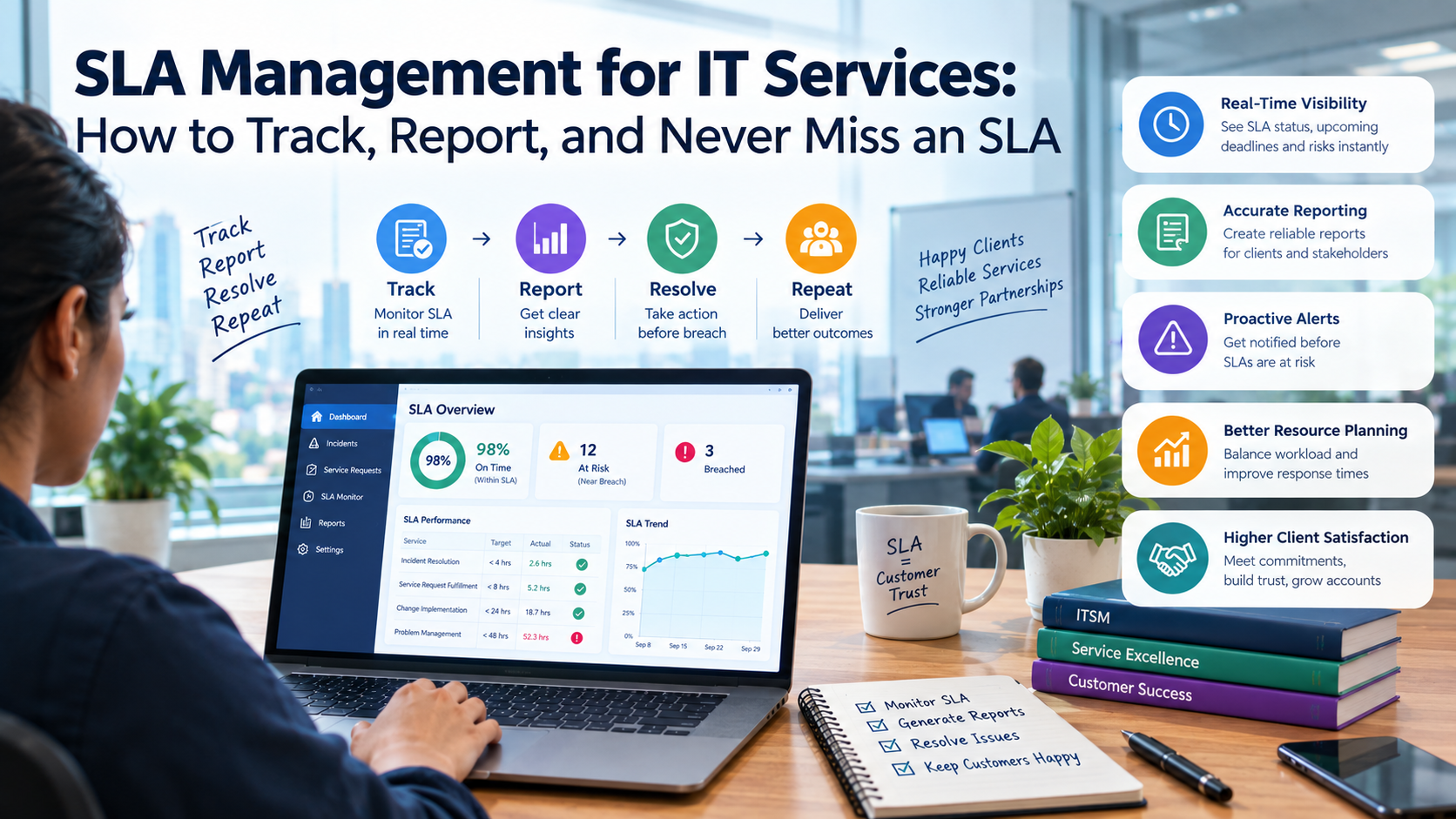
Set escalation alerts at 50%, 75%, and 90% of SLA time remaining. The 50% alert goes to the assigned engineer. The 75% alert goes to the team lead. The 90% alert goes to the delivery manager and account manager. This three-level cascade ensures that the right person is involved at each stage without creating alert fatigue from constant notifications on healthy tickets.
When an escalation alert fires and the assigned engineer has not acknowledged the ticket, the system should auto-reassign to the next available engineer with the required skill. Manual escalation routing that depends on a manager noticing an alert and manually reassigning fails at exactly the moments when managers are busiest.
SLA escalation alerts that only fire in the ticketing system are missed when the engineer is not watching the system. P1 and P2 escalations must reach the engineer via multiple channels simultaneously: platform notification, email, and direct message. On-call P1 alerts should include a phone call or SMS for guaranteed delivery outside business hours.
Operations and delivery managers need a real-time view of all tickets currently within 25% of their SLA limit across all clients. This "at risk" dashboard is the single most effective tool for preventing breaches because it makes the current SLA risk visible without requiring managers to check individual tickets across multiple client queues.
When Breach Happens: The Response Playbook
The moment a ticket crosses its SLA threshold, the account manager should be notified and a proactive client communication should be sent acknowledging the delay and providing an updated resolution estimate. The client finding out about an SLA breach before you tell them is the most damaging version of this event.
Within 24 hours of a P1 or P2 breach, document the root cause: was it a staffing gap, a routing failure, a skills gap, a tool failure, or a genuinely unusual incident volume? The root cause determines the remediation, and the remediation is what you owe the client as part of the breach response.
Most enterprise managed services contracts specify the credit formula for SLA breaches: typically a percentage of the monthly service fee per breach or per percentage point below the contracted attainment threshold. Calculate the credit obligation accurately and apply it to the next invoice without waiting for the client to claim it. Proactive credit application builds more trust than credits extracted through client complaint.
Every SLA breach should appear in the monthly service report with a one-paragraph root cause summary and the specific remediation steps taken to prevent recurrence. Clients who see that breaches are analyzed and acted on rather than ignored accept them as a normal operational reality. Clients who see repeated breaches without visible response do not renew.
KEBS tracks SLA performance in real time across every ticket, every client, and every service tier simultaneously. When a ticket is created, the SLA clock starts automatically based on the client contract and incident priority. KII (KEBS Inform) monitors every active ticket against its SLA threshold and sends escalation alerts at configurable thresholds (50%, 75%, 90% of time remaining) to the assigned engineer, team lead, and delivery manager through the escalation channel defined for the ticket priority.
The SLA risk dashboard shows all tickets currently within 25% of their SLA limit across the entire managed services portfolio in real time, giving operations managers the visibility to intervene before breaches occur rather than after. When a breach does occur, KII automatically logs it, calculates the credit obligation from the contract terms, flags it for inclusion in the next invoice, and queues the account manager for client notification.
Client-facing SLA reports are generated automatically from live ticket data at the end of each reporting period, including attainment rates by tier, trend analysis vs. prior periods, breach events with root cause flags, and credit obligations applied. For IT services firms and managed service providers delivering on multiple client SLAs simultaneously, KEBS provides the real-time monitoring, proactive escalation, and automated reporting that prevents the reactive SLA management cycle that leads to client churn.
Frequently Asked Questions
Never Miss an SLA Again. KEBS Monitors Every Ticket, Every Client, in Real Time.
KEBS tracks SLA clocks automatically, escalates before breach, calculates credit obligations, and generates client-facing SLA reports from live data. Built for IT services firms managing multiple clients and service tiers. Rated 4.7/5 on G2.
Book a Free Demo →