PSA Implementation: The 90-Day Playbook for Professional Services Firms
7 PM tools ranked for professional services. Features, comparison table, and verdict.
Date Posted:
September 15, 2026
Share This:
PSA Implementation: The 90-Day Playbook for Professional Services Firms
PSA implementation failure is more common than vendors acknowledge. Gartner research places enterprise software implementation failure rates at 55 to 75% across categories, and PSA platforms are not exempt. The failures share a pattern: data migration underestimated, change management skipped, configuration attempted before use cases are agreed, and go-live rushed before the team is ready. The platforms themselves are rarely the primary cause. This playbook is designed to prevent all four failure modes by giving delivery leaders a structured 90-day framework that produces a fully operational PSA with high user adoption, clean data, and measurable early value, regardless of which platform you choose.
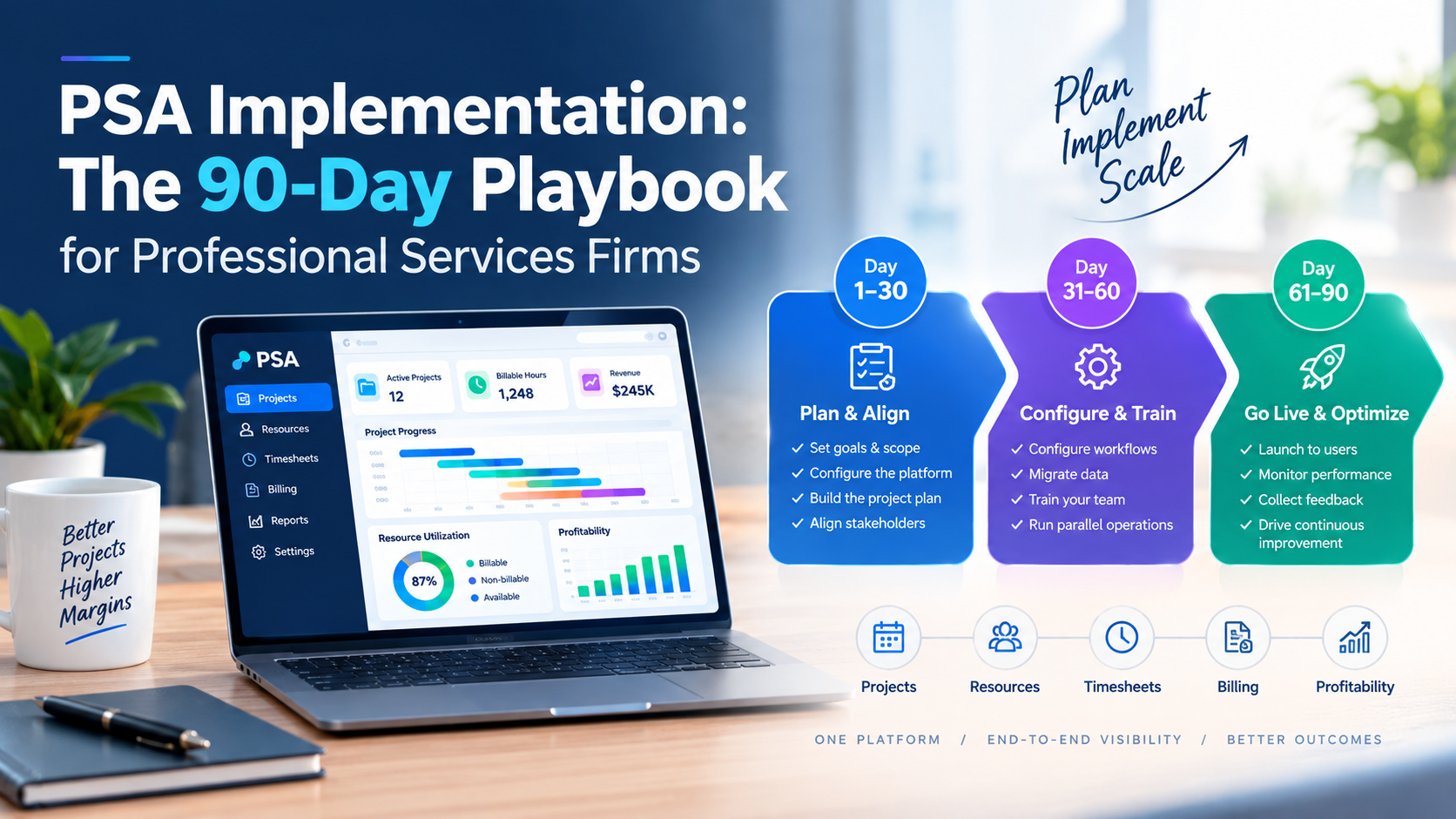
Phase 1 (Days 1 to 30) is foundation: data audit, configuration decisions, stakeholder alignment, and integration setup. Phase 2 (Days 31 to 60) is configuration and testing: the platform is built to your agreed specifications, tested against real scenarios from your delivery operation, and refined before any live data or live users are involved. Phase 3 (Days 61 to 90) is go-live and adoption: phased rollout starting with a pilot team, training delivered in the week before each cohort goes live, and a hypercare period with weekly reviews until adoption is confirmed. The most common mistake is starting Phase 3 before Phase 1 is complete.
Why PSA Implementations Fail: The Four Failure Modes
Before Day 1: The Prerequisites That Determine Success
| Prerequisite | What It Requires | Consequence if Skipped |
|---|---|---|
| Executive sponsor confirmed | A named senior leader (COO, Delivery Head, CFO) with authority to resolve cross-functional decisions and mandate adoption is formally the implementation owner | Implementation decisions stall at every cross-functional boundary; adoption cannot be enforced without senior mandate |
| Implementation team named | Named owners for: project management, data migration, integration, change management, and each functional area (resource management, finance, delivery) | Implementation tasks fall through gaps; no single owner for cross-functional conflicts |
| Use case inventory agreed | Written list of the top 10 to 15 use cases the PSA must support on Day 1, agreed by all stakeholders before configuration begins | Configuration built to assumptions that do not match requirements; re-work during testing |
| Data quality audit complete | Assessment of current state of resource profiles, skills records, rate cards, project data, and timesheet history in legacy systems, with a plan for each data type | Data migration timeline and effort are unknown; go-live blocked by data problems discovered late |
| Integration scope agreed | Written inventory of which systems the PSA must integrate with (HRIS, ERP, CRM, billing, accounting), which integrations are native vs custom, and who owns each | Integration delays discovered during Phase 2 push go-live; custom integrations that should have been budgeted are not in scope |
| Success metrics defined | Agreed KPIs with current baseline and 90-day targets: bench rate, time-to-fill, billing lag, timesheet compliance, utilization | No way to demonstrate ROI post-go-live; implementation perceived as cost rather than investment |
Phase 1 (Days 1 to 30): Foundation
Phase 1 is the least visible phase to end users but the most important for implementation success. Everything that happens in Phase 2 and Phase 3 depends on decisions and data preparation done in Phase 1.
-
Week 1: Platform setup and environment configurationProvision the PSA environment with your organizational structure: business units, practices, geographies, cost centres, and legal entities. Configure user roles and permission levels. Set up the development environment (separate from production) where all configuration will be tested before moving to production. Document every configuration decision in a shared implementation log that all team members can access.
-
Week 1 to 2: Skills taxonomy design and agreementConvene practice leads and the resource management function to agree the skills taxonomy: domain levels (your practices), technology levels (platforms and languages within each practice), and specialisation levels (role-specific depth). Get written sign-off from all practice leads before entering anything in the system. A taxonomy built without practice lead input will not reflect how the delivery organisation actually thinks about its capabilities and will be resisted at the data entry stage.
-
Week 2 to 3: Data extraction and quality auditExport all data from your legacy systems (previous PSA, spreadsheets, HRIS, ERP). Run a data quality assessment against each data type: completeness (what percentage of required fields are populated?), currency (what percentage are current within 12 months?), and accuracy (spot-check audit of a 10% sample against source records). Document the gaps. The data quality audit result determines the data migration timeline in Phase 2 and should be used to reset expectations if gaps are significant.
-
Week 3 to 4: Integration setupBegin integration setup for all native connectors (HRIS, CRM, ERP). Native integrations require configuration but not custom development; complete them in Phase 1 so they can be tested in Phase 2. For any custom integrations, issue the technical specification in Week 2 so that development can begin in parallel with Phase 1 and be ready for testing in Phase 2. Integration delays discovered in Phase 2 are the most common source of go-live slippage.
-
Week 4: Rate card and contract data entryEnter all active client contract rate cards into the PSA during Phase 1, before any billing configuration is tested. Rate cards entered after billing is configured produce incomplete billing tests. For multi-entity firms, enter rate cards for each billing entity separately with the correct currency and applicable tax rules for each. Verify each rate card entry against the signed contract document; rate card errors discovered post-go-live are the most expensive data quality issue to correct.
Phase 1 Exit Checklist
| Exit Criterion | Status Required to Advance to Phase 2 |
|---|---|
| Organisational structure configured in PSA | Complete |
| Skills taxonomy agreed and signed off by practice leads | Complete |
| Data quality audit completed with migration plan | Complete |
| Native integrations configured (HRIS, CRM, ERP) | Complete or in active testing |
| Custom integration specs issued and development begun | In progress with confirmed delivery date |
| Rate cards entered for all active clients | Complete |
| Use case inventory reviewed against Phase 1 configuration | No unresolved gaps |
Phase 2 (Days 31 to 60): Configuration and Testing
Phase 2 converts the foundation built in Phase 1 into a fully configured, tested platform. No real users access the system in Phase 2; all work happens in the development environment.
-
Week 5 to 6: Core workflow configurationConfigure the primary workflows against the agreed use case inventory: timesheet submission and approval workflow (including daily submission enforcement, project code assignment, billable vs non-billable categorisation, and manager approval routing), resource allocation and demand request workflow (skills-based matching configuration, approval chain for allocation decisions, soft vs hard booking rules), and billing workflow (billing period definition, invoice generation triggers, rate card application rules, and finance approval routing before delivery).
-
Week 6 to 7: Data migration executionMigrate data in priority order: active resource profiles and skills records first (required for allocation and bench management from Day 1 of go-live), then active projects and current allocations, then client rate cards and contract data (confirm against Phase 1 entries), then historical timesheet data (for reporting continuity; lowest priority for operational go-live). Run the migration in the development environment first, validate the output against source data, resolve errors, then migrate to production in Week 8.
-
Week 7: Integration end-to-end testingTest every integration with real data flows, not synthetic test cases. An HRIS integration test should use a real employee record from Keka or Darwinbox and verify that their leave balance, cost rate, and skills profile appear correctly in the PSA after sync. A billing integration test should generate a test invoice in the PSA and verify it appears correctly in the accounting system. Document every test result; any integration that does not produce correct output with real data must be resolved before Phase 3 begins.
-
Week 7 to 8: Use case scenario testingTest every use case from the agreed inventory with real operational scenarios. For each use case, define: the starting condition, the steps to complete the use case in the PSA, and the expected output. Run each scenario in the development environment and document the result. Any use case that does not produce the expected output is a blocking issue for go-live. Use case testing with real scenarios is the only reliable way to catch configuration errors that would produce operational problems after go-live.
-
Week 8: UAT with pilot usersSelect 5 to 8 pilot users representing each major function (resource manager, project manager, finance, timesheet user) and run a structured User Acceptance Testing session. Pilot users complete their top 3 to 5 daily tasks in the PSA using the development environment. Collect feedback on usability, missing workflow steps, and configuration gaps. Resolve all blocking issues before advancing to Phase 3. Non-blocking issues (UI preferences, report formatting) can be addressed post-go-live.
Phase 3 (Days 61 to 90): Go-Live and Adoption
-
Week 9: Pilot go-live (20 to 30% of users)Go live with the pilot cohort: one or two practices, the resource management function, and the finance team. The pilot cohort uses the PSA for real operational work for one full billing cycle. Monitor daily: timesheet completion rates, allocation workflow usage, billing queue accuracy, and integration data quality. The pilot period surfaces real operational issues that testing missed and gives you the fixes before the full organization goes live.
-
Week 9 to 10: Training delivery for full rolloutTrain all remaining users in the week before their go-live date, not two weeks before (knowledge degrades before it is applied) and not on go-live day (no time to apply learning before first use). Training should be role-specific: timesheet users need 45-minute training on submission workflow and project code selection; project managers need 90-minute training on delivery management, change order workflow, and budget monitoring; resource managers need 2-hour training on allocation, demand requests, and KAIS dashboards; finance needs 2-hour training on billing workflow, rate card management, and revenue recognition.
-
Week 10 to 11: Full go-live (remaining users)Roll out to all remaining users in cohorts by practice or function. Each cohort goes live with a dedicated support contact available for the first three days. A hypercare channel (Slack, Teams, or email alias) is active for all users with a 2-hour response SLA during business hours. The pilot cohort's experience should be socialised before full go-live so early users can share real-world tips, reducing anxiety about the platform among users who have not yet used it.
-
Week 11 to 13: Hypercare and weekly reviewsRun weekly implementation review meetings for the first four weeks post-go-live, covering: timesheet compliance rate by practice (target above 90% by Week 3), allocation workflow adoption rate, billing cycle performance (was the first invoice generated from the PSA accurate and on time?), integration data quality (no errors in HRIS or ERP sync?), and open issues log with resolution dates. The weekly cadence maintains momentum and surfaces adoption issues before they become embedded habits.
Data Migration: The Detailed Guide
| Data Type | Priority | Typical Effort | Key Risks | Mitigation |
|---|---|---|---|---|
| Resource profiles | 1 (Critical for Day 1) | 1 to 2 weeks | Incomplete skills data; stale role levels | Skills validation sprint before migration; practice lead review of each profile |
| Skills records | 1 (Critical for Day 1) | 2 to 4 weeks (if starting from scratch) | Missing or unvalidated skill entries; taxonomy mismatches | New taxonomy entry during migration; skills data loading exercise with managed deadline |
| Active projects and allocations | 1 (Critical for Day 1) | 1 to 2 weeks | Incomplete project scope data; missing allocation end dates | Project manager review of each active project record before migration |
| Client rate cards | 1 (Critical for Day 1) | 1 week | Rate card versions inconsistent with signed contracts | Cross-check each migrated rate card against signed contract document |
| Historical timesheet data | 2 (For reporting continuity) | 1 to 3 weeks | Project code mapping errors; missing approval records | Migrate 12 months minimum; validate sample against legacy system reports |
| Historical project data | 3 (For analysis, not operations) | 2 to 4 weeks | Data volume; incomplete margin data from legacy systems | Migrate closed projects from last 24 months only; accept incomplete margin data and supplement manually for key engagements |
Change Management: The Program Most Teams Skip
The platform is ready when the configuration is complete. The implementation is successful when the people change how they work. Those are different milestones, and the second one requires active management.
Select one champion per practice (typically a senior consultant with peer credibility) who gets early access, is trained ahead of everyone else, and becomes the go-to person for practice-level questions at go-live. Champions reduce the support load on the implementation team and improve adoption speed by 30 to 50% compared to implementations without them.
Every communication about the PSA implementation should lead with why it benefits the people receiving it (less time on admin, fewer billing disputes, better visibility of who can take on the interesting projects) before covering how it works. Communications that lead with features and process changes produce more resistance than communications that lead with user benefit.
Post timesheet compliance rates by practice on a shared dashboard visible to practice leads. Name the practices that hit 95-plus percent compliance. Name the ones that are below 80%. Compliance rates that are tracked and visible to leadership produce faster improvement than rates that are only visible to the implementation team.
Training delivered more than 7 days before a system is used is largely forgotten by the time it is needed. Schedule role-specific training in the 5 working days immediately before each user cohort's go-live date. Shorter training closer to use produces 2 to 3 times higher retention than longer training in advance.
Measuring PSA Implementation Success
| Metric | Baseline (Pre-Implementation) | 30-Day Target | 90-Day Target |
|---|---|---|---|
| Timesheet compliance rate | Measure before go-live | Above 80% | Above 95% |
| Bench rate | Measure before go-live | Measurement established; early signals visible | 5 to 10pp reduction from baseline |
| Time-to-fill (allocation) | Measure before go-live | Allocation workflow in use; baseline visible | 40% reduction from baseline |
| Period-close to invoice delivery | Measure before go-live | First PSA-generated invoice delivered; lag measured | Under 3 days from period close |
| Billing realization rate | Measure before go-live | First PSA billing cycle complete | 3 to 5pp improvement from baseline |
| User adoption rate | N/A | Above 75% of users active in PSA | Above 95% of users active; shadow systems eliminated |
The KEBS implementation follows a structured delivery model that compresses the 90-day framework into 4 to 8 weeks for standard deployments, without requiring an SI partner. The KEBS Customer Success team handles implementation directly, with a named customer success manager who owns the engagement from contract signature to post-go-live hypercare.
Week 1 covers environment setup, organisational structure configuration, and kickoff with the client implementation team. The KEBS team runs the skills taxonomy workshop in Week 1 to produce a signed-off taxonomy before any data loading begins. Integration setup for native connectors (Keka, Darwinbox, SAP, Salesforce, HubSpot, Jira) begins in Week 1 and is typically complete by the end of Week 2 for standard integration configurations.
Data migration uses KEBS-provided templates for all data types, with a validation step before production loading. The KEBS team reviews migration output quality and flags gaps before they become production issues. For firms migrating from Kytes, or from spreadsheet-based operations, migration templates are pre-populated with common field mappings to reduce manual data preparation effort.
Training is delivered by the KEBS Customer Success team in role-specific sessions in the week before go-live. Sessions are live (not pre-recorded) so that firm-specific configuration and workflows are covered rather than generic platform training. Post-go-live hypercare includes a dedicated support channel with 2-hour business-hours response SLA and weekly review calls for the first four weeks. The KEBS KAIS data readiness score on the implementation dashboard shows adoption progress and data quality in real time, so the client and KEBS teams can see implementation health without manual reporting.
Typical 90-day outcomes for KEBS implementations: timesheet compliance above 94%, bench rate reduction of 30 to 50% from baseline, billing lag reduction from 12 to 18 days to under 2 days, and resource manager time on allocation tasks reduced by 60 to 70%. For a 50-person IT services firm, these outcomes typically represent $150,000 to $300,000 in recovered revenue and cost savings within the first two quarters of operation.
Frequently Asked Questions
Ready to Implement in 4 to 8 Weeks? KEBS Customer Success Has Done It Hundreds of Times.
Structured 90-day playbook. No SI partner required. Named customer success manager from Day 1. Skills taxonomy workshop, data migration templates, role-specific training, and 4-week hypercare included. From $5/user. Rated 4.7/5 on G2.
Book a Free Demo →